First Page
Download for Mac

What's new on the web.

Every change to First Page on the web, newest first.

  1. First Page on the web

    Typing that leaves your words alone

    Typing that leaves your words alone. The editor no longer rewrites the line you're typing in. Quotes open and close the way you type them, a correction leaves your cursor where it was, and a new character name that starts like a returning speaker's types to the end. A CONT'D you type yourself stays, and text you compose with an input method is left alone until you finish.

    Parentheticals that behave. Type (laughs) on an empty dialogue line and keep writing: your dialogue follows the closing parenthesis. Return in the middle of one closes the first half and opens the second, and Backspace in an empty pair takes both away.

    Final Draft spaces kept. Two spaces after a period, and any other run of spaces in a line, come back from Final Draft as they were written and go back out the same way.

    The same editor on the web and the Mac. Tab and Shift-Tab do the same thing in every kind of line. When the name or heading you typed is already in your script, Return keeps it, and an ellipsis character becomes three periods, the way screenplays spell it. Undo takes back exactly what each step did.
  2. First Page on the web

    Only you can read it, and keep your free days

    Every script is encrypted. Every screenplay, title and folder name First Page holds is encrypted on your device before it's saved, and our database no longer has anywhere to store a readable one. There's nothing to turn on.

    Subscribe early, pay when your trial ends. Choose Suite during your free trial and you keep every free day: nothing is charged until the trial ends, and you can cancel any time before then from Manage plan. In the trial's last two days or so, Suite is charged when you choose it instead, and checkout shows which before you pay. Your monthly studio voices and Analysis reads start with the first payment.

    Ready to type the moment it opens. A new script puts the cursor on its first line, so you can start typing without a click. In smaller windows the toolbar wraps onto a second row instead of hiding buttons past the edges.

    Also in this release

    A letter that isn't a shortcut closes the element picker and goes into the line, and pasting or dictating closes it too.

    Escape closes the Views and Show/Hide menus.

    Listen from the title page, the Beat Board or the Navigator switches to the script and opens.

    Exporting a PDF no longer stops for blank lines you left on purpose.

    Buttons keep their label and show a spinning wheel while they work.

  3. First Page on the web

    Stage plays, and 14 days free

    Write stage plays. Choose New Stage Play in your library and write in standard play format: character names centered, speeches across the page, stage directions indented in parentheses, and each act and scene on a new page, with a title page and an uncounted cast page. Any script can switch between screenplay and stage play in its settings.

    The same play everywhere. Plays print and export to PDF in play format, export to Final Draft with their play layout, and come back from Final Draft, Fountain, PDF and Word as plays. Your plays look the same on the web and the Mac, page for page.

    Try it free for 14 days. Make a free account and confirm your email to write free for 14 days, with no card. When the trial ends, every script still opens, reads, listens, prints and exports, and you can keep writing up to 3 scripts on the web.

  4. First Page on the web

    The Navigator, and Final Draft round trips

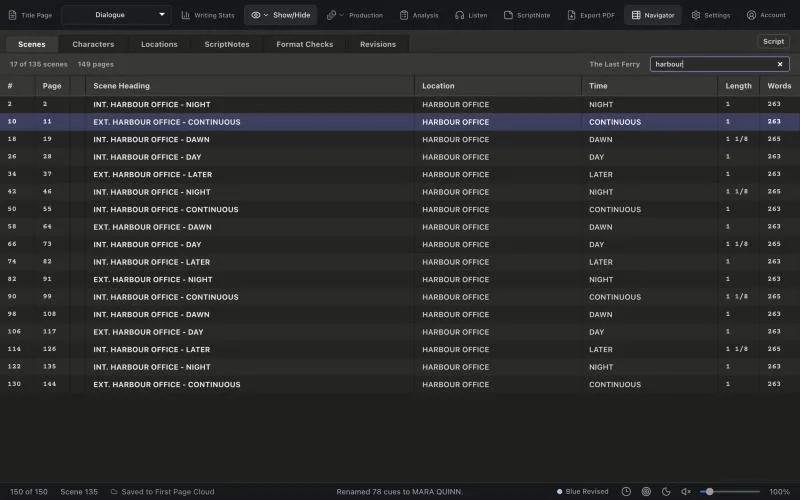
    The Navigator on the web in dark mode: the Scenes list filtered to 17 of 135 scenes for harbour, with page, location, time, length and words for each.

    The Navigator, rebuilt. Scenes, Characters, Locations, ScriptNotes, Format Checks and Revisions, each with page, length in eighths, words and scene colour. Start typing to filter, use the arrow keys to move, and press Return to go to a scene.

    Edit where you look. Press Return on a scene to retype its heading, or on a character to rename them in every cue, with extensions kept. Each edit is one step in Undo, and with Track Revisions on the new words are marked.

    Final Draft files come back whole. Title pages, styled text, page layout, headers and footers, SmartType lists, notes and their colours now survive a trip through First Page, so far more of a Final Draft script goes back the way it came.

  5. First Page on the web

    A calmer Beat Board

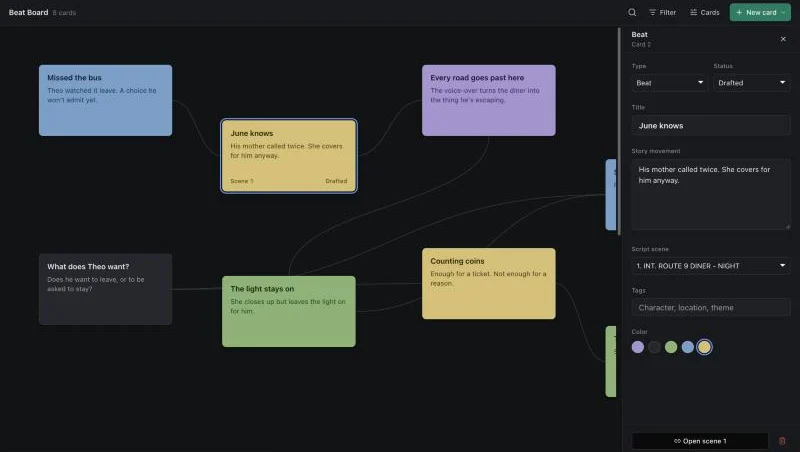
    The Beat Board on the web in dark mode: soft blue, yellow, purple and green index cards joined by faint curved lines, with June knows open in the details panel beside the board.

    Cards in the style you like. Choose Index for soft colour cards, Quiet for neutral cards with a dot of colour, or Tinted for a wash of colour, in a comfortable or compact size. The Cards menu on the board keeps your choice for every script.

    More room for the story. One slim toolbar holds search, filters and New card. A card's details open when you double-click it or press Return, and close when you click the board.

    Lines that follow the story. The lines between cards curve from one card to the next without crossing back over them, and you can turn them off from the Cards menu.

  6. First Page on the web

    Writing Stats, rebuilt

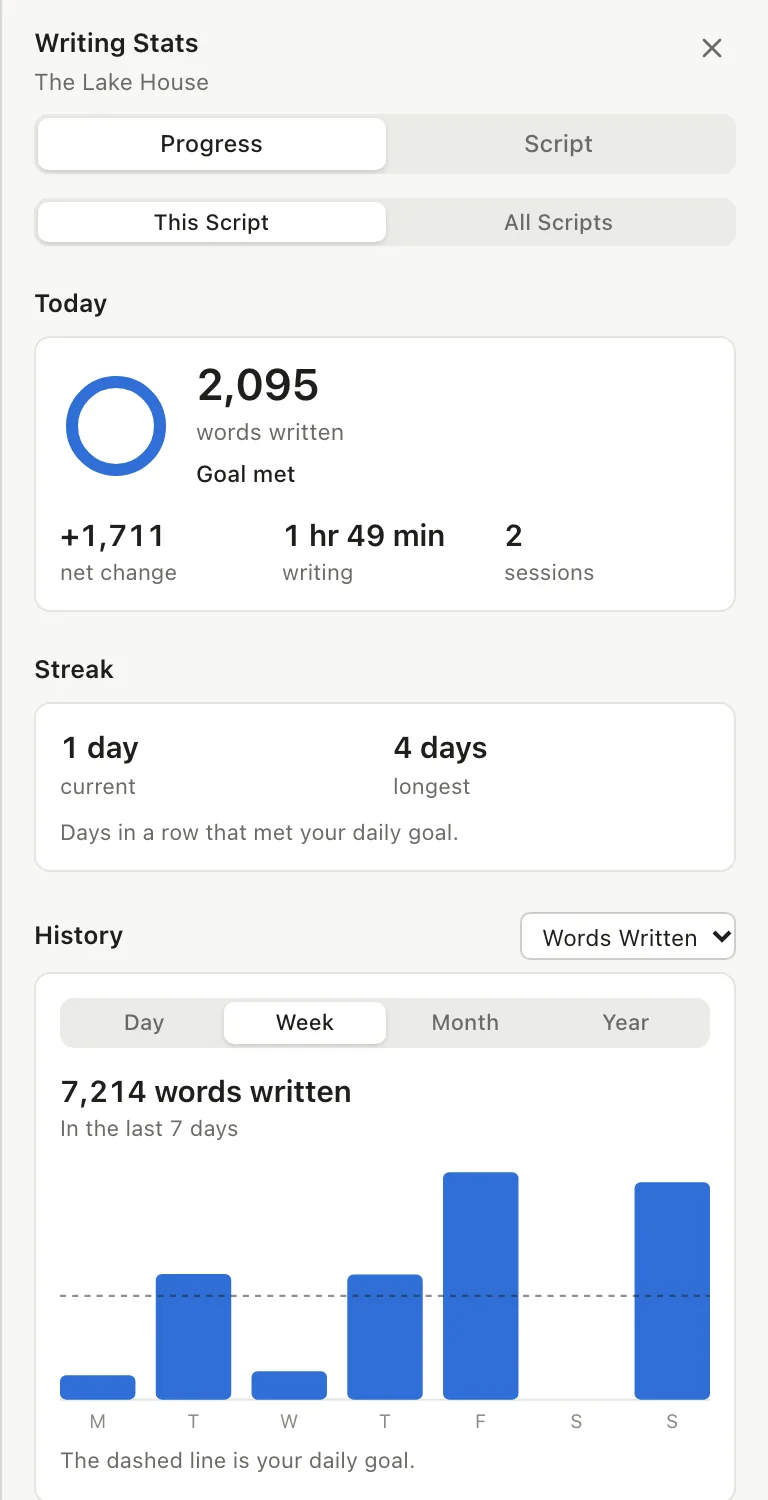
    The Writing Stats panel on the web: 2,095 words written today, a one-day streak, and a week of words written with the daily goal as a dashed line.

    Your progress at a glance. Open Writing Stats from the toolbar. Progress shows today against your daily goal, your streak, a history chart with your goal marked, your averages, when in the week you write, and a draft target with the day you'll reach it. Look at one script or all of them.

    Your script, measured. The Script tab shows pages in eighths and screen time, the longest scenes (click one to go there), dialogue against action, each character's share of the dialogue, and how your scenes split between interior and exterior, day and night.

    Private, and on every device. Your history is counts and times, never your words. It syncs between the web and your Macs sealed with your key, so no one else can read it, and collaborators never see it. Clear it whenever you like.

    Also in this release

    When the same script changed in two places and both added a new line, a note or a revision mark on one of those lines now stays with its own line.

    The Move to menu inside a script's menu follows dark mode, and the tabs in account settings switch at once.

  7. First Page on the web

    Long cues wrap on the page

    A long character cue and a word too long for its line now wrap instead of running off the page, the same on the web and the Mac.

  8. First Page on the web

    Production revisions

    Revisions, the way a production runs them. Turn on Track Revisions and every change is marked with the current revision set and an asterisk in the margin. Use the WGA order or your own sets.

    Pages and scene numbers that hold. Lock Pages for A-pages, and Lock Scene Numbers for A-scenes. Omit a scene and OMITTED holds its place until you restore it.

    Print what the production needs. Print and export PDFs with revision marks and headers, only the revised pages if you like, tinted in each set's color. Marks travel in the Final Draft files you export and import. We built this from Final Draft's documented format and haven't yet tried it with a file from Final Draft that has revisions, so check a copy before you rely on it.

    See what changed since any version. Mark Changes Since a Version compares your script with an earlier version or another file and marks every difference.

  9. First Page on the web

    Script notes, and a library that files as you go

    Script notes in the editor. Add a note to any line, give it a color, and resolve it when you're done. Notes are shared with the Mac, so a note you leave on one shows on the other.

    A library that files as you go. Each script row has a folder chip that files it, a ⋮ menu for everything else, and deleting asks twice.

    Versions for every script. Earlier versions are kept for each script on its own, and controls that did nothing are gone.

    The same page breaks as the Mac. Pages now break where they break on the Mac, so the page count and the printed pages match wherever you write.

    Also in this release

    Forced scene headings in Fountain files come back as you wrote them.

  10. First Page on the web

    A calmer library, and a one-tap sign-in

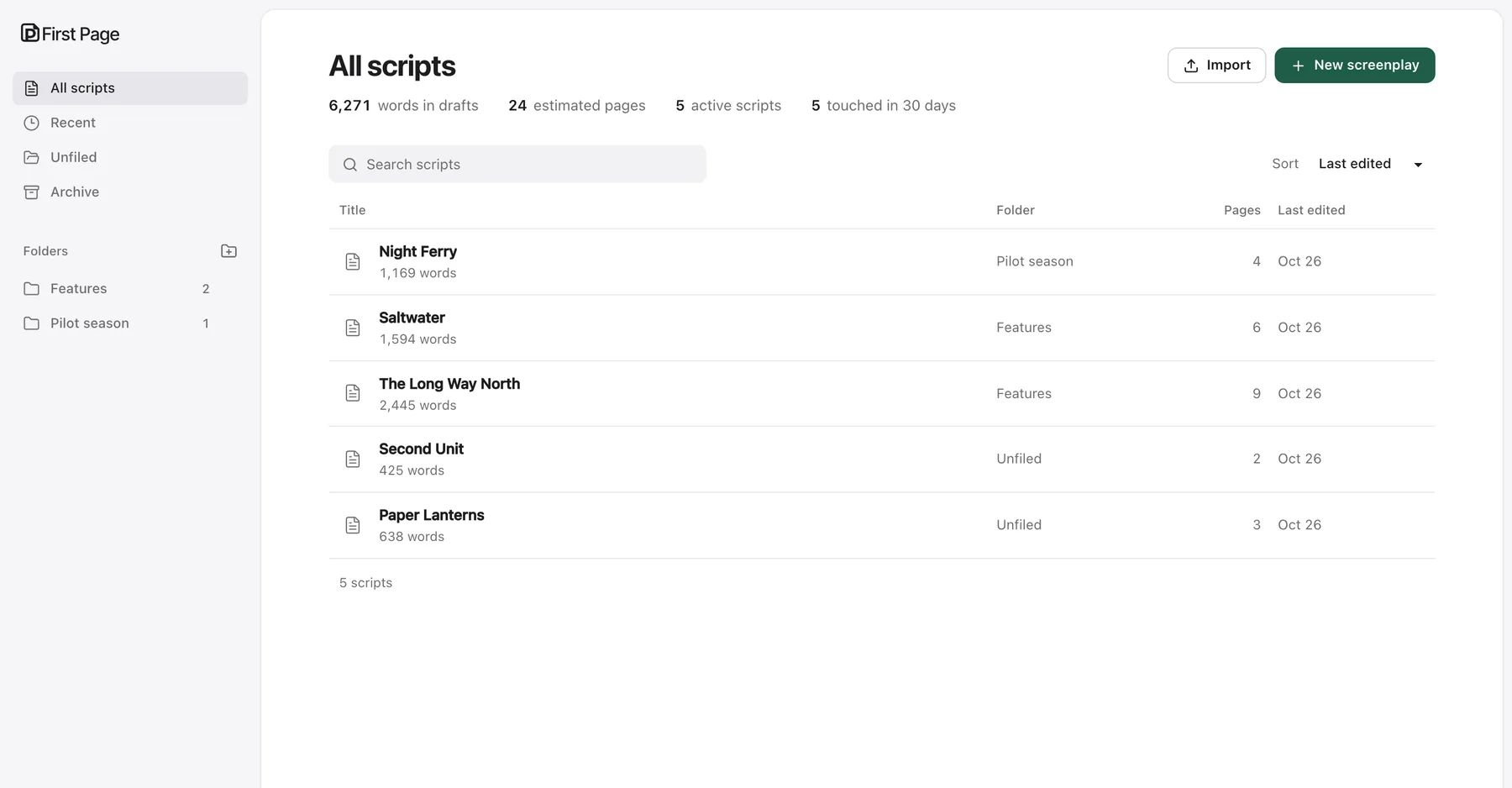
    The web library: All scripts with words in drafts and pages, a search field, and five scripts with their folders and when each was last edited.

    A calmer library and settings. The library and settings share one inset panel, with Apple's greys and settings grouped in rows. Scrollbars stay quiet until you scroll, and nothing scrolls sideways beside a panel.

    Long scripts stay quick. Typing in a long script no longer redraws the whole script, and the page number follows your scrolling, not just the cursor.

    One tap to sign in. A passkey signs you in and unlocks your scripts in one tap, and a browser stays unlocked across signing out.

  11. First Page on the web

    Free for three scripts

    Older scripts, encrypted when you choose. Scripts you saved before First Page added encryption stay as they are until you press Encrypt, with a copy to download first and every script checked before and after.

    The web app is free for three scripts. Write up to three scripts in the browser without paying anything.

  12. First Page on the web

    Live collaboration

    Write a script together, live. Share a script by email and write in it together, on the web or the Mac, with each person's cursor and name in their own color. Shared scripts are encrypted end to end. Sharing comes with Suite or Lifetime, and anyone you invite can read for free.

    Nobody's writing is overwritten. Both versions of a line rewritten at once are kept for you to choose from. Notes and the Beat Board are shared, and Author colors and the Changes panel show who wrote what.

    Invites, requests and a shared trash. Someone who opens a link to a script they aren't on can ask for access. Owners can move a shared script to the trash for everyone, and restore it.

    Also in this release

    What you type in a line survives a reload, a closed tab or leaving the editor.

  13. First Page on the web

    Live updates from your other devices

    Changes from your other devices arrive while you write. When you save on another device, the script in front of you takes the change in moments, and keeps your place.

    Nothing the Mac wrote is lost. Saving from the web keeps the notes, revisions and every field the web doesn't edit itself.

  14. First Page on the web

    Clearer cloud saves, and PDFs ready to send

    Saved to First Page Cloud, and nothing lost to a clash. The status bar says Saved to First Page Cloud, Saving, or Offline when it is. If the same script changed somewhere else, the two are merged line by line, and a clash is kept as a conflicted copy instead of being lost.

    PDFs that are ready to send. PDF export prints the title page and saves under the script's name. Title page hints are never printed.

  15. First Page on the web

    Private by design

    Your scripts are private. Cloud scripts are encrypted in your browser before they're saved, so only you can read them. Set it up with a passkey or a recovery key, and unlock a new browser by approving it from a device you already use.

    One switch removes Listen and Analysis. Turn off Listen and Analysis for your account and they disappear from the editor everywhere you sign in.

    Nothing you write is kept. Studio voices play each scene without it being stored on our servers, and Analysis keeps none of the draft it reads.

  16. First Page on the web

    Listen, and PDF and Word import

    Listen. Hear your script read through by a full cast, with a narrator for the action.

    Import PDF and Word scripts. Bring in screenplays saved as PDF or Word.

  17. First Page on the web

    Analysis

    Ask for notes on the whole draft and work through them beside the script. Mark each one done or set it aside, and the next read says what moved since the last.

  18. First Page on the web

    Clearer plans and devices

    Know what you bought. A purchase shows a confirmation with the plan by name, your plan is named on every settings page, and Connected Macs is now Connected Devices.

    Parentheticals type cleanly. Typing a parenthetical in dialogue works as it should.

  19. First Page on the web

    First Page on the web

    A screenplay editor on the web. Write a screenplay in the browser, formatted as you type. Script Assist completes character names and scene headings.

    Writing sprints. Start a sprint from the clock in the status bar, with a countdown and the words, scenes and pages you add. Forward only stops deleting until the sprint ends.

Write with the newest First Page.

Download it for Mac, or write in your browser.

macOS 14 or newer, on Apple silicon and Intel.