First Page
Download for Mac

What's new on the Mac.

Every release of First Page One, newest first.

  1. First Page One 1.7.1

    Typing that keeps what you meant

    Typing that keeps what you meant. Character names take a space, so MARY ANN stays two words. A parenthetical ends at its closing parenthesis and your dialogue follows it, and Return in the middle of one leaves no stray parenthesis behind. Accented letters typed with Option come out as one letter, and quotes curl the right way as you type them.

    Punctuation that stays put. Type three periods and a space and the cursor stays after the space. An ellipsis character you type, paste or open becomes three periods, the way screenplays spell it. A new sentence starts with a capital, and a word after an ellipsis or "e.g." doesn't.

    No more jumping. Type with your cursor scrolled out of view and the script goes to it once and stays there, instead of hopping back and forth.

    CONT'D that knows the difference. First Page adds CONT'D when a speaker carries on after action, and takes its own off when they don't, even after you rename them. A CONT'D you type yourself stays. One Undo takes back an automatic CONT'D along with what you typed.

    Suggestions that respect what you typed. When the name or heading you typed is already in your script, Return keeps it, even when a longer one starts the same way. Ordinary words are no longer turned into a transition, an act heading or a shot. An act heading needs its number, like ACT IV.

    The same editor on the Mac and the web. Tab and Shift-Tab do the same thing in every kind of line. Pasted text and Fountain come in as scene headings, action, characters and dialogue. Undo takes back exactly what each step did, and undoing a Return puts the cursor back where it was.

    Also in this release

    Two spaces after a period, and any other run of spaces in a line, come back from Final Draft as they were written.

    Return at the start of a line moves the whole line down.

    A stage direction gets its parentheses when you leave the line.
  2. First Page One 1.7.0

    Stage plays

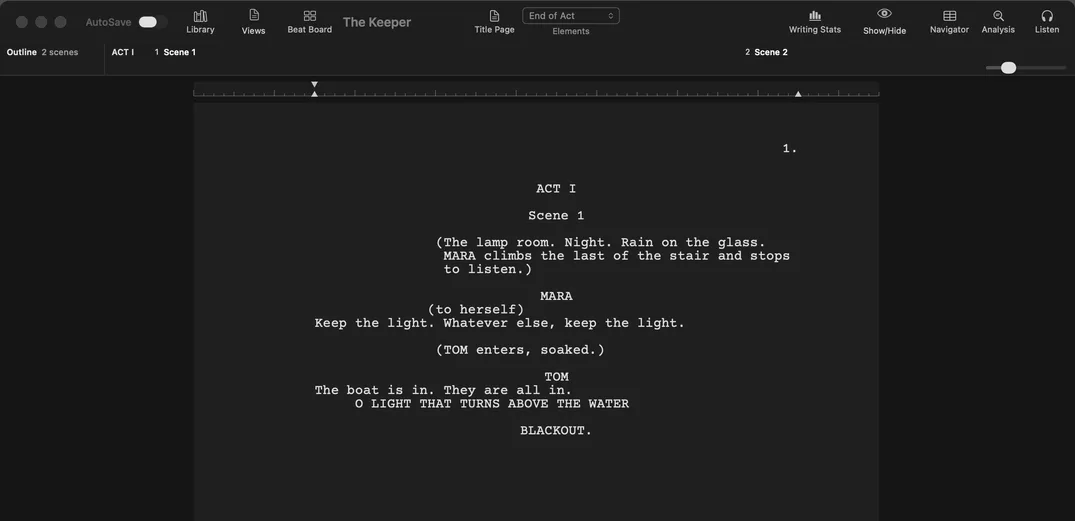
    A stage play in First Page on the Mac in dark mode: ACT I and Scene 1 centered, a stage direction in parentheses, MARA and TOM centered above their speeches, and BLACKOUT at the end of the scene.

    Write stage plays. Choose File › New Stage Play, press Option-Command-N, or start one from the Library. A new play opens with a cast page, ACT I and Scene 1, ready to write. Any script can switch between screenplay and stage play from Format › Script, and nothing you wrote changes but the layout.

    Laid out the way theatres expect. Character names centered, speeches across the page, stage directions indented in parentheses, and each act and scene on a new page, as the Dramatists Guild and Samuel French formats ask. The title page reads like a play's, the cast page goes uncounted, and page 1 is the first page of the play. Prefer the modern style? Directions move to the middle of the page in italics, without parentheses. Page numbers can read act, scene and page, like II–1–51.

    Keys that know a play. Return after a name takes you to the speech and after a speech back to a name. Tab switches between a stage direction and a character. Start a cast member's name in a stage direction and First Page offers it in capitals, and it suggests the next act and scene in the style you already use.

    Plays in and out. Plays print and export to PDF in play format, export to Final Draft with their play layout, and come back from Final Draft, Fountain, PDF and Word as plays. Listen reads stage directions without the parentheses, and the Navigator lists acts with their scenes.

    Try it free for 14 days. Sign in with a free account and confirm your email to write free for 14 days, with no card. When the trial ends, every script still opens, reads, listens, prints and exports.

    Also in this release

    The Library button, View › Show Local Library and the Dock icon open the Library even when the app started with only scripts open.

    The scene strip keeps its colors when the Mac switches between light and dark.

    A Final Draft paragraph marked Act opens as a new act, and a Fountain action forced over several lines keeps all of them.

  3. First Page One 1.6.0

    The Navigator, and long scripts in a moment

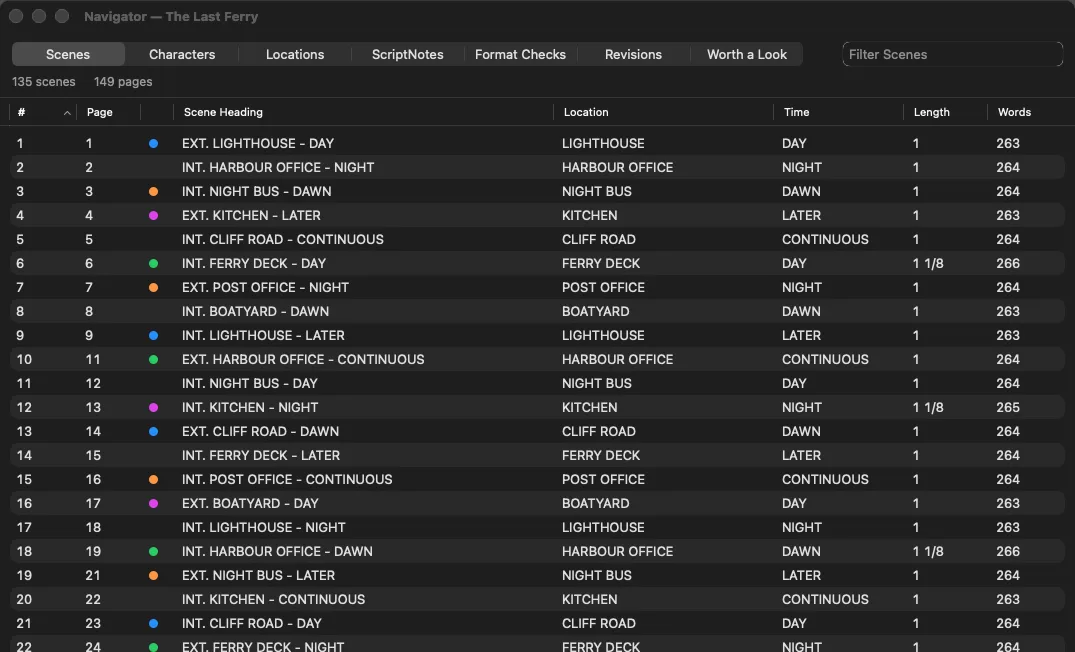
    The Navigator on the Mac in dark mode: the Scenes tab of a 149-page script, with each scene's page, color, heading, location, time, length and words.

    The Navigator, rebuilt. Scenes, Characters, Locations, ScriptNotes, Format Checks and Revisions, each with page, length in eighths, words and scene color. Start typing to filter, use the arrow keys to move, and press Return to go to a scene. Command-1 to Command-7 switch tabs, and the script window follows the row you select.

    Edit where you look. Press Return on a scene to retype its heading, or on a character to rename them in every cue, with extensions kept. Right-click a scene to change its number, give it a color or omit it, and a ScriptNote to mark it resolved. Each edit is one step in Undo, and with Track Revisions on the new words are marked.

    Long scripts open in a moment. A 150-page script opens in about half a second instead of two, revisions and all, and the window answers while it does. Typing stays quick however long the script runs, and a Beat Board of 400 cards opens five times faster.

    Final Draft files come back whole. Title pages, styled text, page layout, headers and footers, SmartType lists, notes and their colors now survive a trip through First Page, so far more of a Final Draft script goes back the way it came.

    The revision header on every page. In page view each page shows its revision set beside its number, as it prints. Clear Revision Marks shows how many marks each set holds, and Scene Number works from anywhere in a scene.

    Also in this release

    On a shared script, choosing a scene color or marking a ScriptNote resolved can now be undone, in order with your typing. Undo leaves alone anything a collaborator changed since.

  4. First Page One 1.5.3

    Writing Stats, and one history on every device

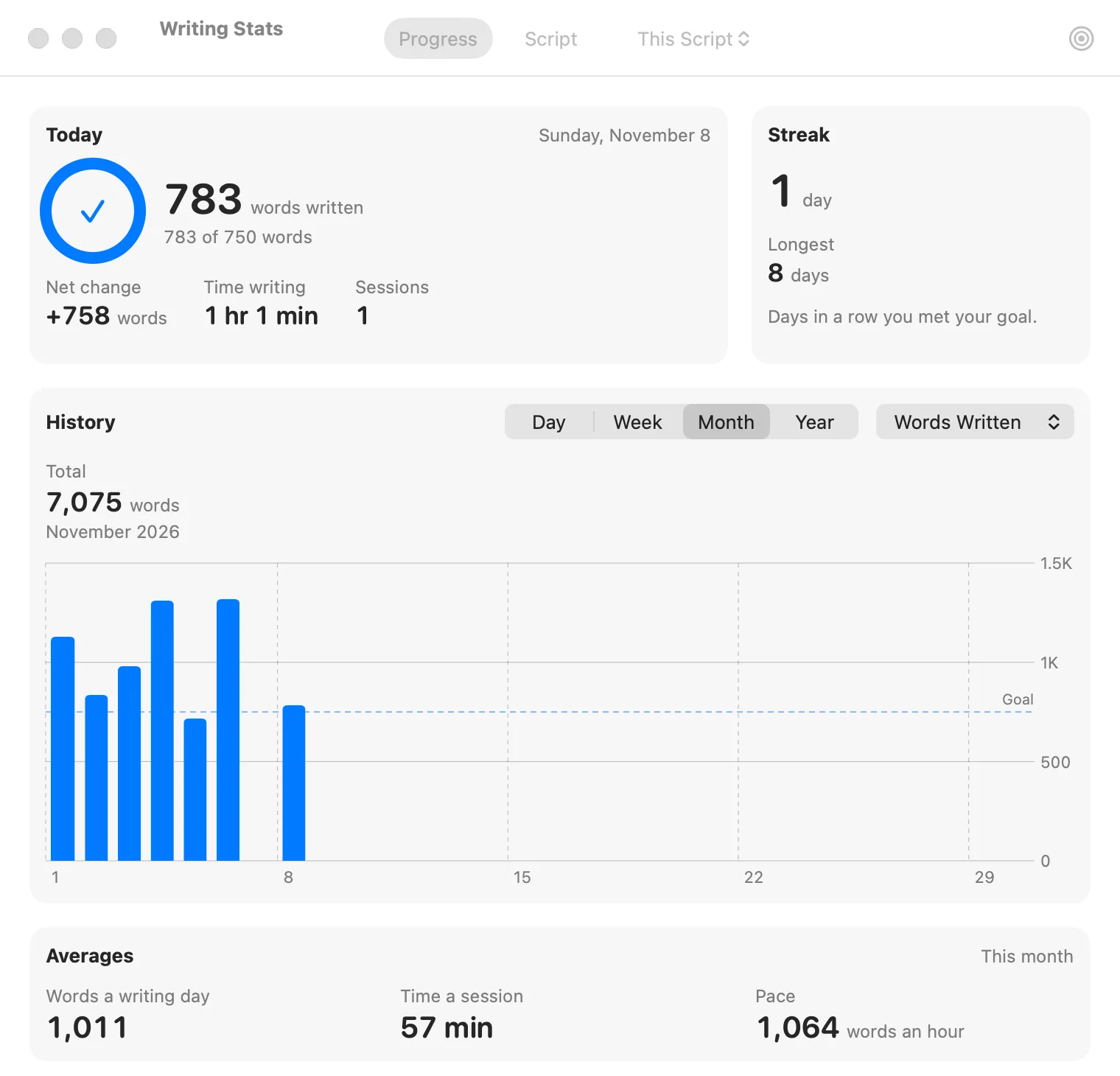
    The Writing Stats window on the Mac: 783 words written today against a goal of 750, a one-day streak, and a month of words written with the daily goal marked.

    Writing Stats, in its own window. Choose Window › Writing Stats, or press Option-Command-S. Progress shows today against your daily goal, your streak, a history of what you wrote with your goal marked, your averages, and the hours of the week you tend to write. Set a draft target in pages and it tells you when you'll get there at your current pace.

    Know your script at a glance. The Script tab shows its length in pages and eighths with an estimate of screen time, its longest scenes (click one to go there), the balance of dialogue and action, each character's share of the dialogue, and how your scenes split between interior and exterior, day and night.

    One history on every device. Your writing history follows you between your Macs and the web. It's only counts and times, never your words, and it's sealed with your key before it leaves your Mac, so no one else can read it. Collaborators never see it.

  5. First Page One 1.5.2

    The library, redesigned

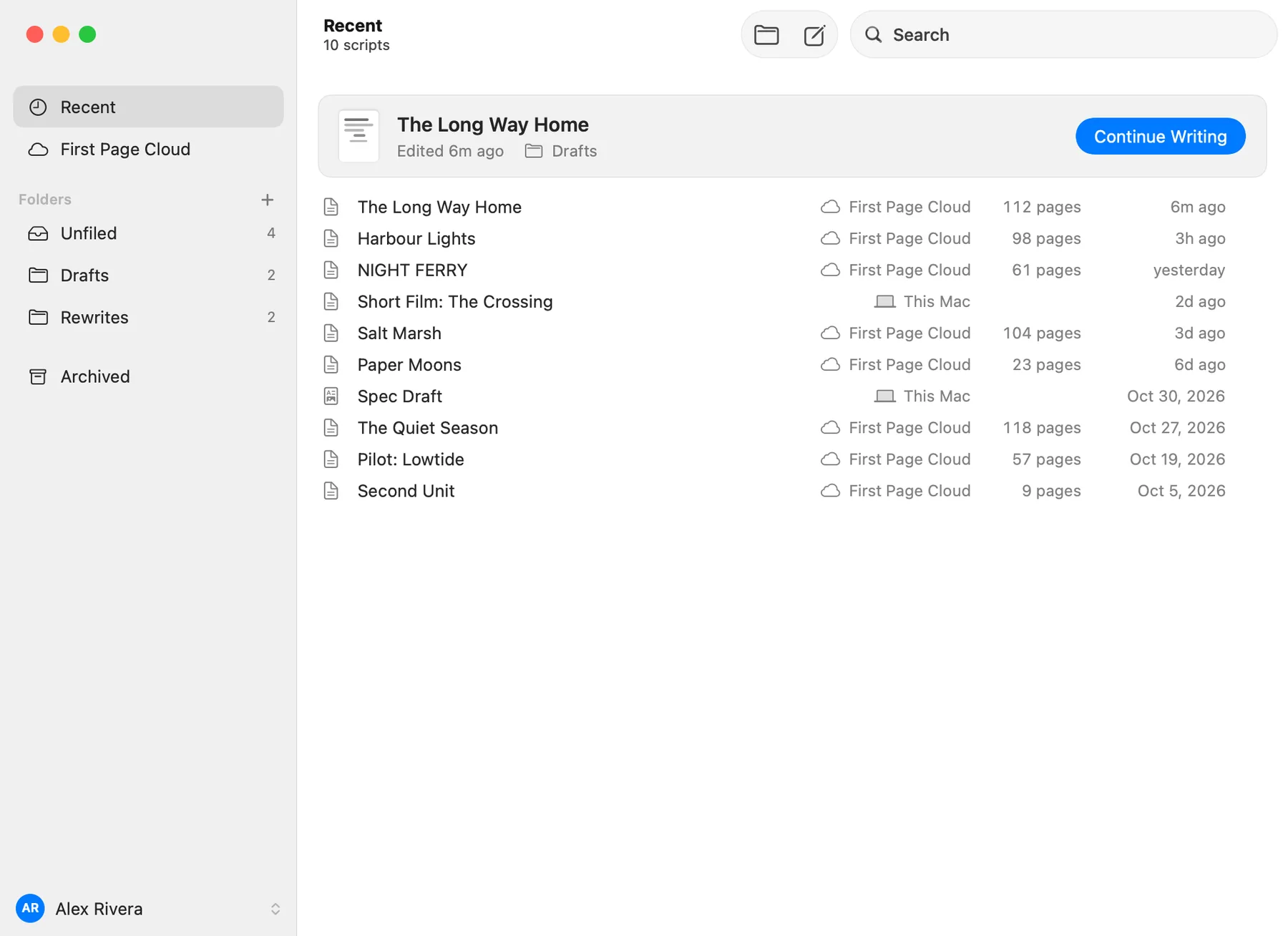
    The new Mac library: a sidebar with Recent, First Page Cloud and folders, Continue Writing for The Long Way Home, and ten scripts, one per line.

    A new home for your scripts. The library is now a proper Mac window: a sidebar for Recent, First Page Cloud, Shared with you, your folders and Archived, and a toolbar with search and New Screenplay. Each script sits on one line with where it lives, its page count and when you last changed it.

    Back to work in one click. Recent opens with Continue Writing, for the script you were last in.

    Find any script fast, from the keyboard. Press Command-F and type. Search doesn't mind capitals or accents. The arrow keys move through your scripts and Return opens one. Delete always asks first, names the script, and Return or Escape keeps it.

    Your account in one place. Sign Out, Settings and plans now sit in the account menu at the foot of the sidebar.

    Also in this release

    When the same script was changed on two Macs and both added a new line, a note or mark on one of those lines could end up on the other. Each now stays with its own line.

  6. First Page One 1.5.1

    A fix for typing in scripts with notes

    When two notes in a script shared the same id, which can happen when a script is edited on more than one Mac, the first keystroke closed the app. Each note now stays with its own text, and typing carries on as normal.

  7. First Page One 1.5.0

    Production revisions

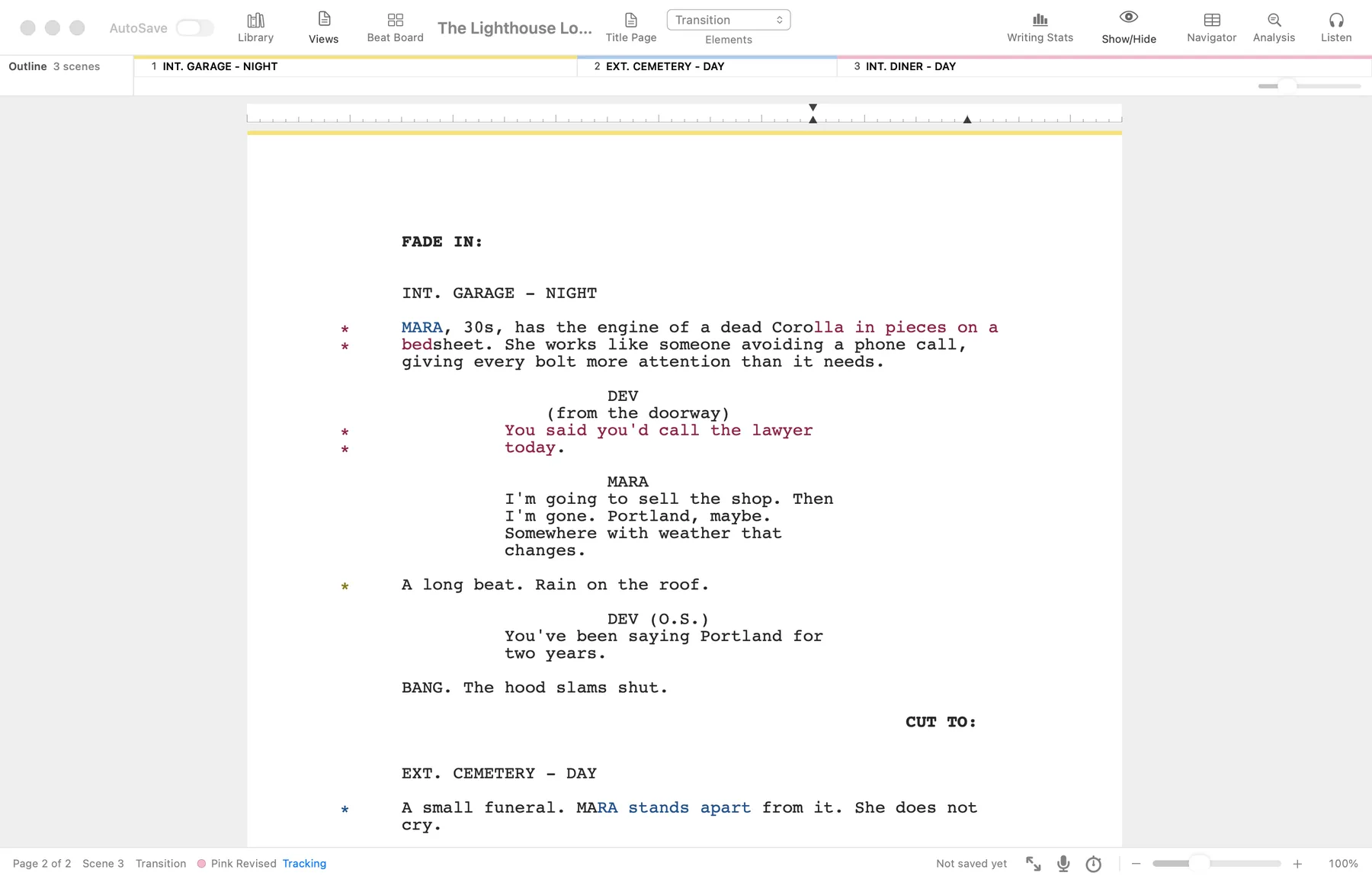
    A script on the Mac with Track Revisions on: changed lines in the revision set's color, with asterisks in the margin.

    Revisions, the way a production runs them. Turn on Track Revisions and what you change is marked with the current revision set, with an asterisk in the margin. Sets come in WGA order, or use your own: Manage Revision Sets lets you add, rename, recolor, reorder and delete them. All of it works the same on the Mac and on the web.

    Page 12 stays page 12. Lock Pages keeps every page where it is. New material lands on A-pages such as 12A. Unlock Pages whenever you're done.

    Scene numbers that hold. Lock Scene Numbers keeps them fixed, and a scene you add between two becomes 12A. Omit Scene leaves OMITTED in its place, and Restore Scene brings it back exactly as it was.

    Print what the production needs. Printing and PDFs carry your revision marks and each page's revision header. You can print only the revised pages, and tint each one in its set's color.

    See what changed since any version. Mark Changes Since a Version compares your script with an earlier version or another file, and marks the differences. Marks, locked pages and scene numbers are saved in the Final Draft files you export and read back from them. We built this from Final Draft's documented format and haven't yet tried it with a file from Final Draft that has revisions, so check a copy before you rely on it.

    Pages that match the web. Courier Prime comes with the app, and the document's own header and footer print, with page numbers. Dual dialogue sits side by side and breaks at sentences, a speech a page breaks carries (MORE) and (CONT'D), and the page count matches the pages drawn.

    Also in this release

    Each library row has a ⋮ menu, Archived keeps scripts out of the way, and deleting asks twice.

  8. First Page One 1.4.1

    Older scripts, encrypted when you choose

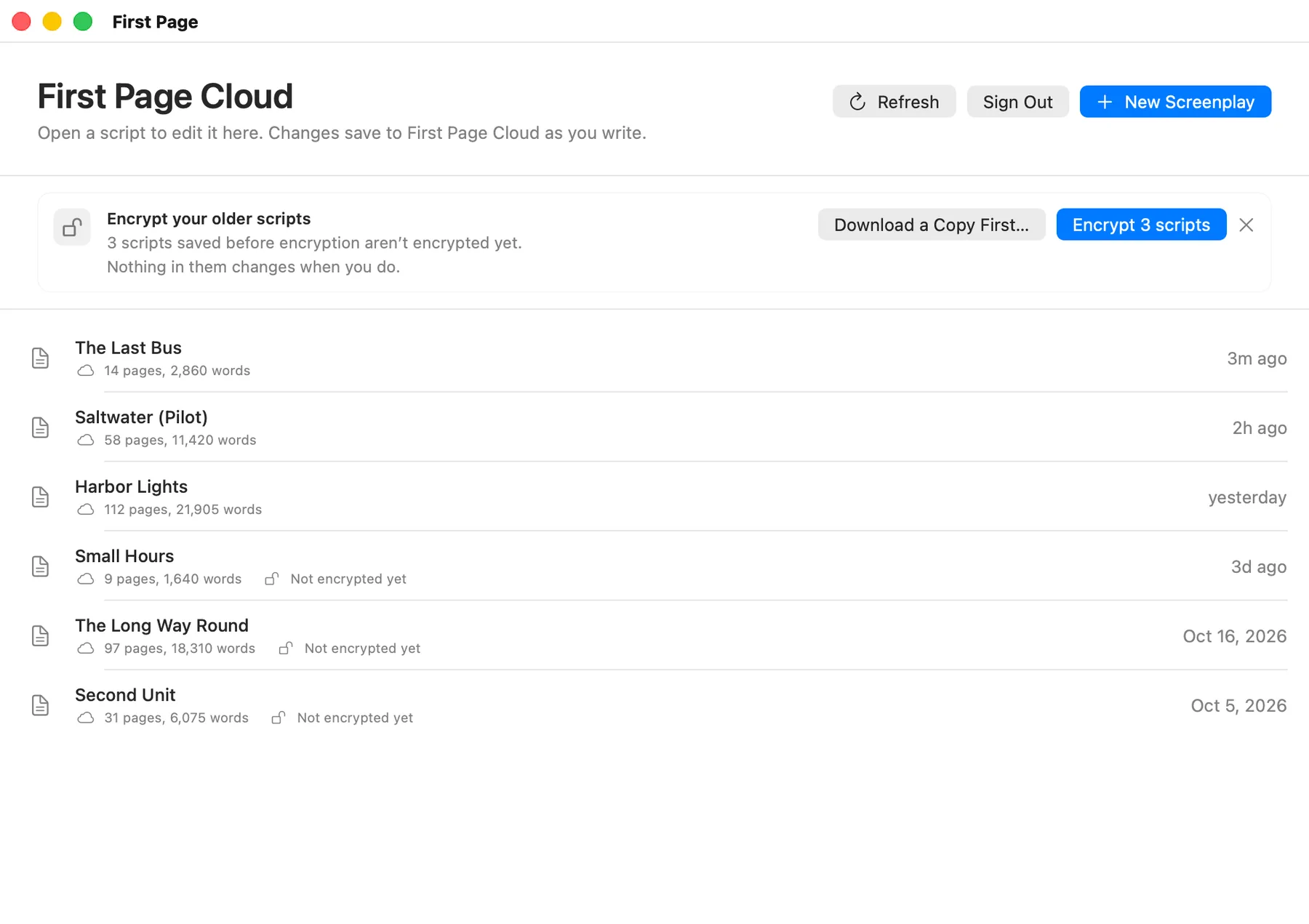
    The First Page Cloud library on the Mac, with a card offering to encrypt three older scripts and a button to download a copy first.

    Your older scripts stay as they are until you choose. Scripts you saved to First Page Cloud before First Page added encryption are no longer encrypted on their own when you sign in. Each one shows "Not encrypted yet" in the library. When you're ready, press Encrypt on the card at the top of the library. Or close the card and keep writing.

    Nothing is lost along the way. Before you start, Download a Copy First saves every older script to a folder you choose. Each script is checked on your Mac before and after it's encrypted. If a check doesn't pass, encrypting stops and you keep that script as it was.

    Also in this release

    When you change an older script and it saves, that script is encrypted with your change in it.

    The page number in the bottom corner now updates as you scroll, in any view.

  9. First Page One 1.4.0

    Live collaboration

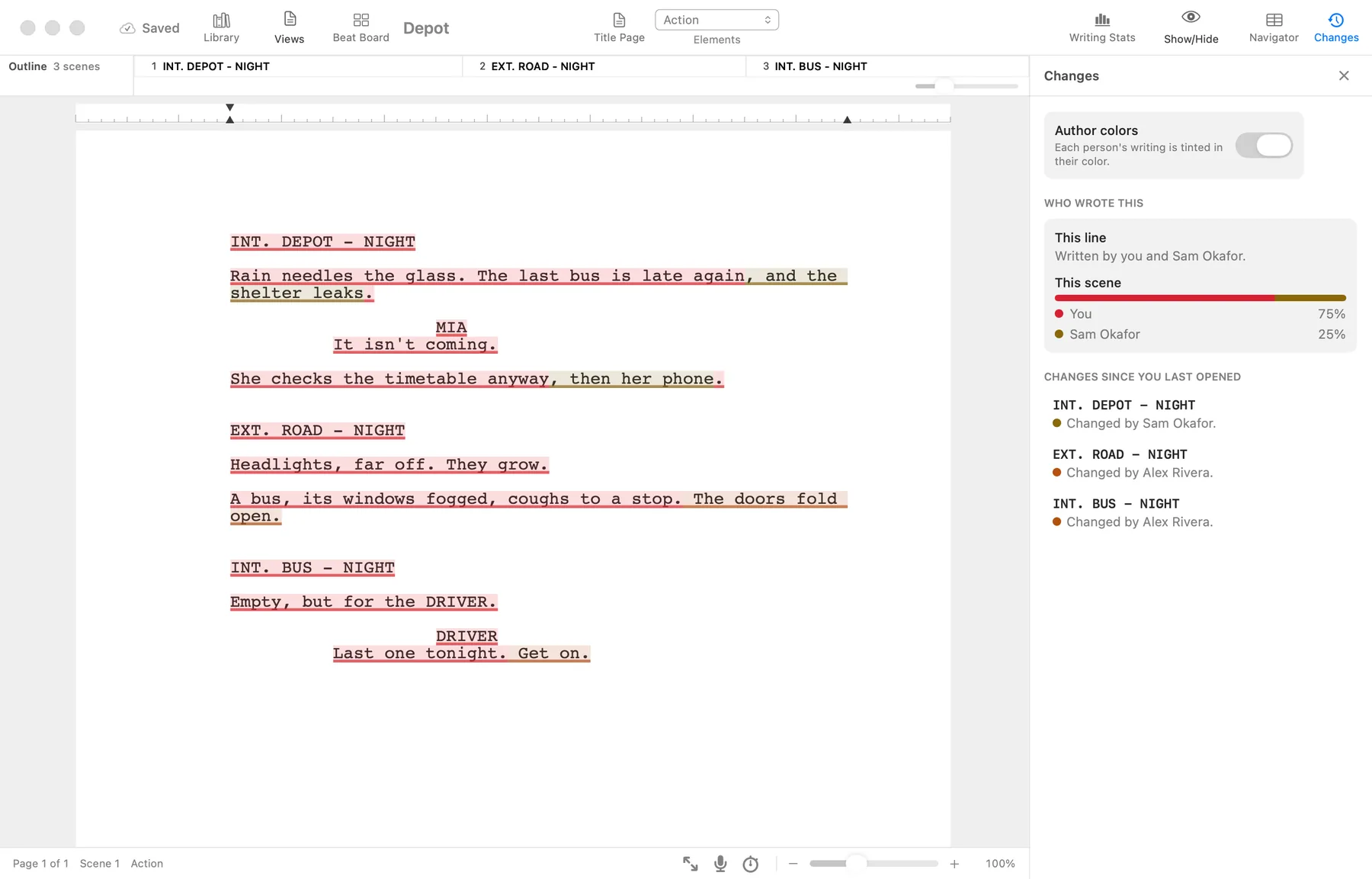
    A shared script on the Mac with Author colors on: each person's lines tinted in their color, and the Changes panel listing what Sam Okafor and Alex Rivera changed.

    Write a script together, live. Press Share in a script's toolbar and invite the people you choose by email. Everyone you invite can open the script on their Mac or on the web, and you see each other write as it happens, each with their own colored cursor and name. Sharing comes with Suite or Lifetime, and anyone you invite can read for free.

    Nobody's writing is overwritten. If two of you rewrite the same line at once, both versions are kept and you choose which to keep. If you edit a line someone else just deleted, the line comes back. Undo takes back your own typing, and never a collaborator's.

    Notes and the Beat Board are shared too. Script notes belong to the shared script. The Beat Board is live: cards move as your co-writers move them.

    See who wrote what. Turn on Author colors and each person's writing shows in their color. The Changes panel lists everything that changed while you were away. First Page works this out on your Mac, and nothing about who wrote what is sent anywhere.

    Shared scripts are encrypted end to end. Every line, card, note and title is encrypted on your Mac before it reaches us. Only you and the people you share with hold the key. When you remove someone, the script moves to a new key.

    Folders in First Page Cloud. Your cloud folders show in the library sidebar. Make, rename and delete them, and move scripts between them. Making a folder comes with Suite or Lifetime.

    Typing in a long script is much faster. A keystroke in a 120-page script used to take about a tenth of a second. Now it takes about one frame.

    Also in this release

    Changes you save on another Mac or on the web reach the script in front within moments.

    Title page hints such as "Name of First Writer" are never printed or exported, and imports keep their draft date.

  10. First Page One 1.3.0

    Cloud scripts that save themselves

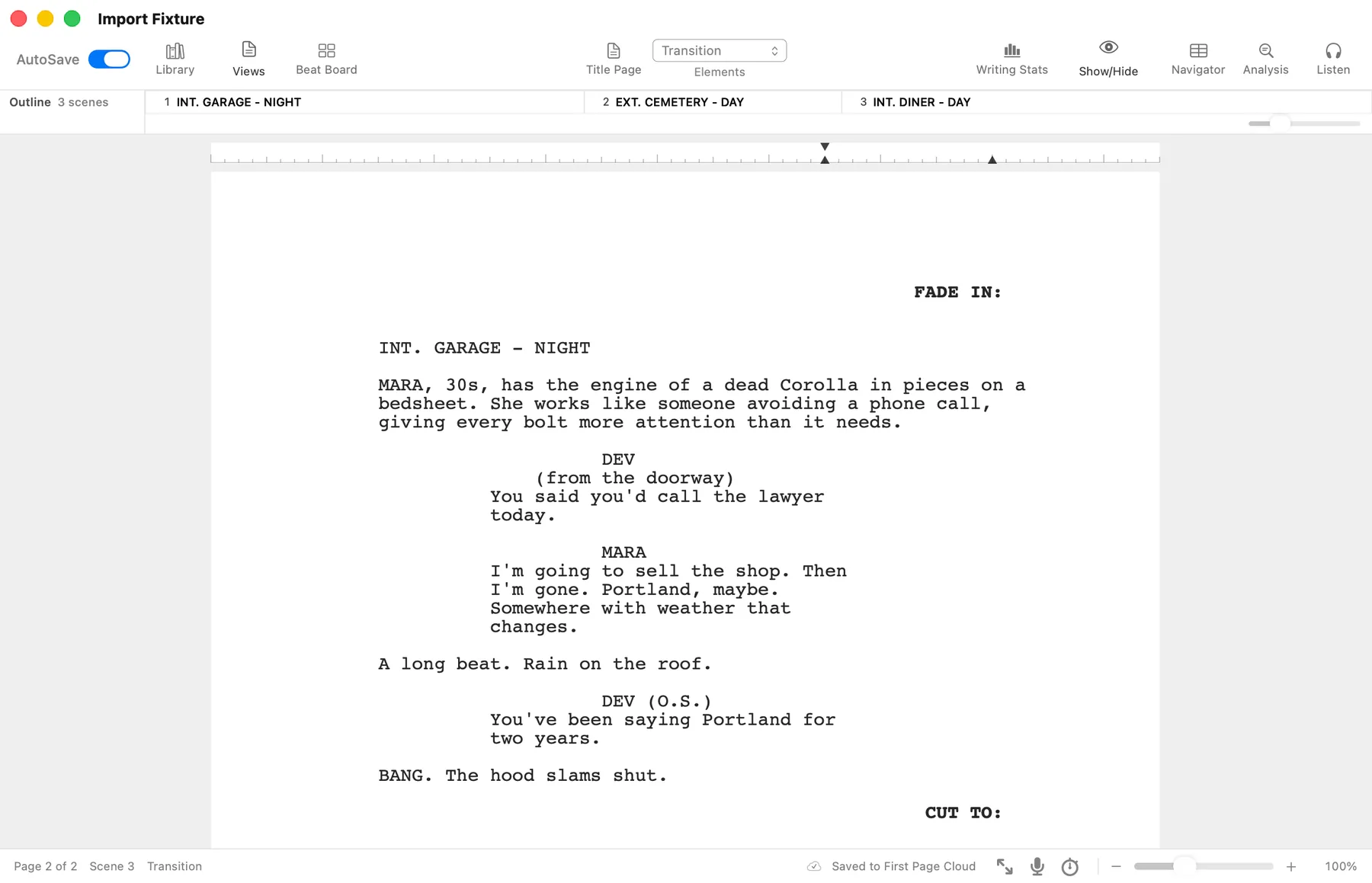
    A script window on the Mac with AutoSave switched on at the start of the toolbar, and Saved to First Page Cloud in the status bar.

    AutoSave to First Page Cloud. Every script window has an AutoSave switch at the start of its toolbar. Turn it on and the script lives in First Page Cloud, encrypted on your Mac so only you can read it, and saves itself a couple of seconds after you pause typing. Offline, your changes wait on this Mac and go up when you're back. AutoSave comes with Suite or Lifetime.

    A copy stays on this Mac. Every script in First Page Cloud keeps an up-to-date, encrypted copy on this Mac, so you can keep working when the cloud can't be reached. Your recovery key opens the copies even without an account or a connection.

    Write in two places at once and lose nothing. If the same script changed somewhere else, First Page merges the two line by line. If you both changed the same line, your version stays and the other is kept as a script of its own.

    Nothing is deleted. If your subscription lapses, the switch shows Paused. Your cloud scripts stay readable, and you can still open, export and print them.

  11. First Page One 1.2.0

    Private by design

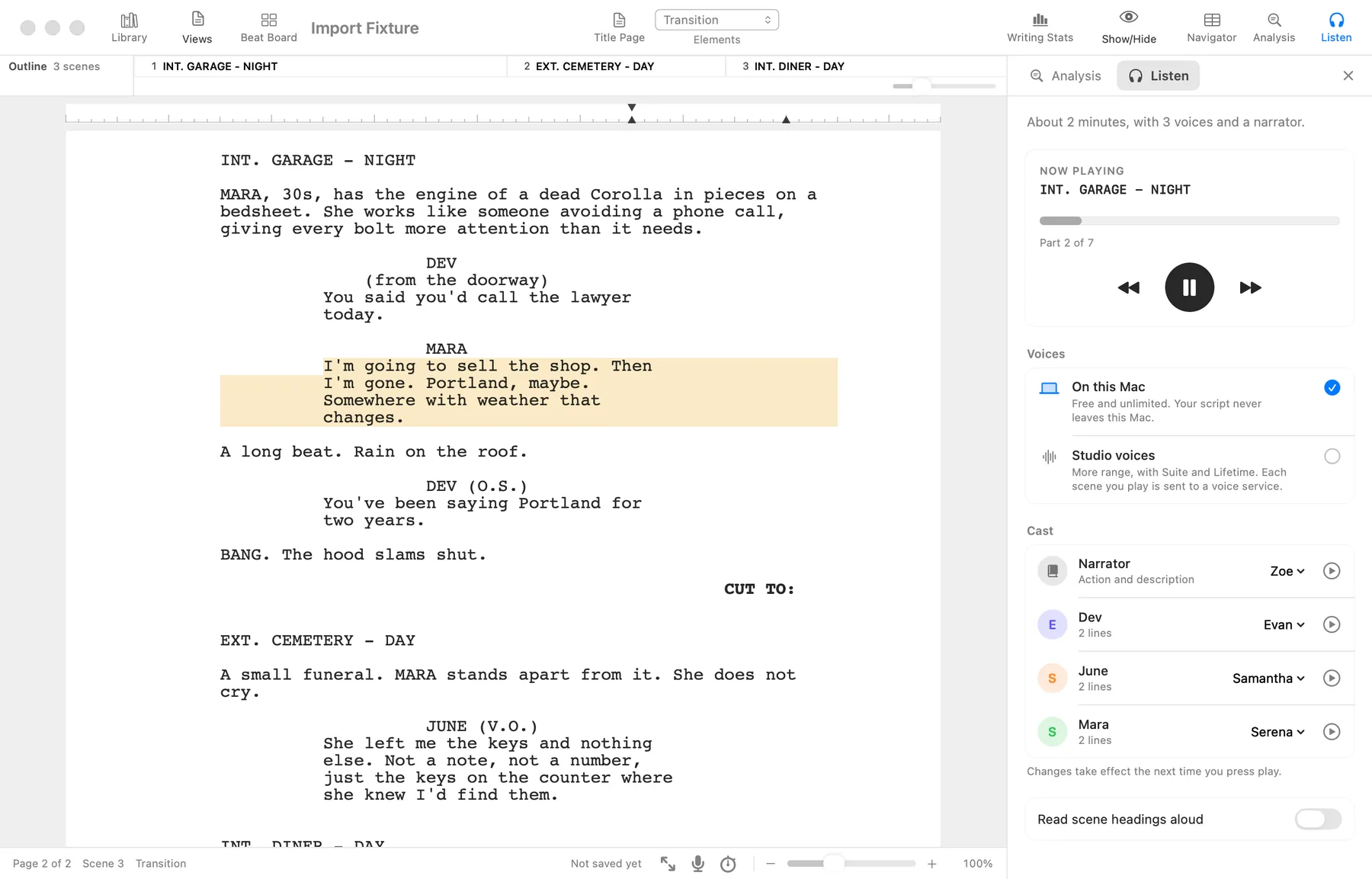
    Listen playing a scene on the Mac with the voices on this Mac, the line being read highlighted on the page and the cast in the side panel.

    Your cloud scripts are private. Cloud scripts are encrypted on your device, so only you can read them. Not even First Page can. Their titles and folder names are encrypted too. The first time you sign in, First Page asks how you'd get back in if you lost this Mac: a recovery key, or approving it from a Mac you already use.

    Listen is free with the voices on your Mac. Hear your script read by a full cast, with a narrator for the action and the line being read highlighted on the page. It's unlimited, it works without an account, and your script never leaves your Mac.

    Never lose a page. If First Page or your Mac stops unexpectedly, the next launch offers your unsaved changes back. File › Browse Earlier Versions shows earlier drafts of a script, to restore or open as a copy.

    First Page One keeps editing, online or offline. An activated Mac edits on any day, with any clock, and after any time offline.

    One switch removes Listen and Analysis. Turn off Show Listen and Analysis under Privacy in Settings, and both leave the toolbar, the menus and every window.

    Help without seeing your work. Messages that something went wrong include a short support code, so we can find what happened without seeing your writing. Crash reports never include your writing, and you can turn them off.

  12. First Page One 1.1.3

    Clearer labels

    Lines such as a script's page count or how long Listen will take now read as sentences, without separators between them.

  13. First Page One 1.1.2

    A side panel for Listen and Analysis

    A side panel that belongs to the window. Listen and Analysis share one panel with a tab for each. The toolbar stays put when it opens, and you can drag the panel wider or narrower.

    Listen starts in seconds. Listen plays the first lines within seconds, and shows its progress while the rest gets ready.

  14. First Page One 1.1.1

    A launch fix

    1.1.0 could quit on launch, and ask for your keychain password again and again. It now launches, and asks for your password at most once for each item First Page keeps in the keychain.

  15. First Page One 1.1.0

    Listen and Analysis

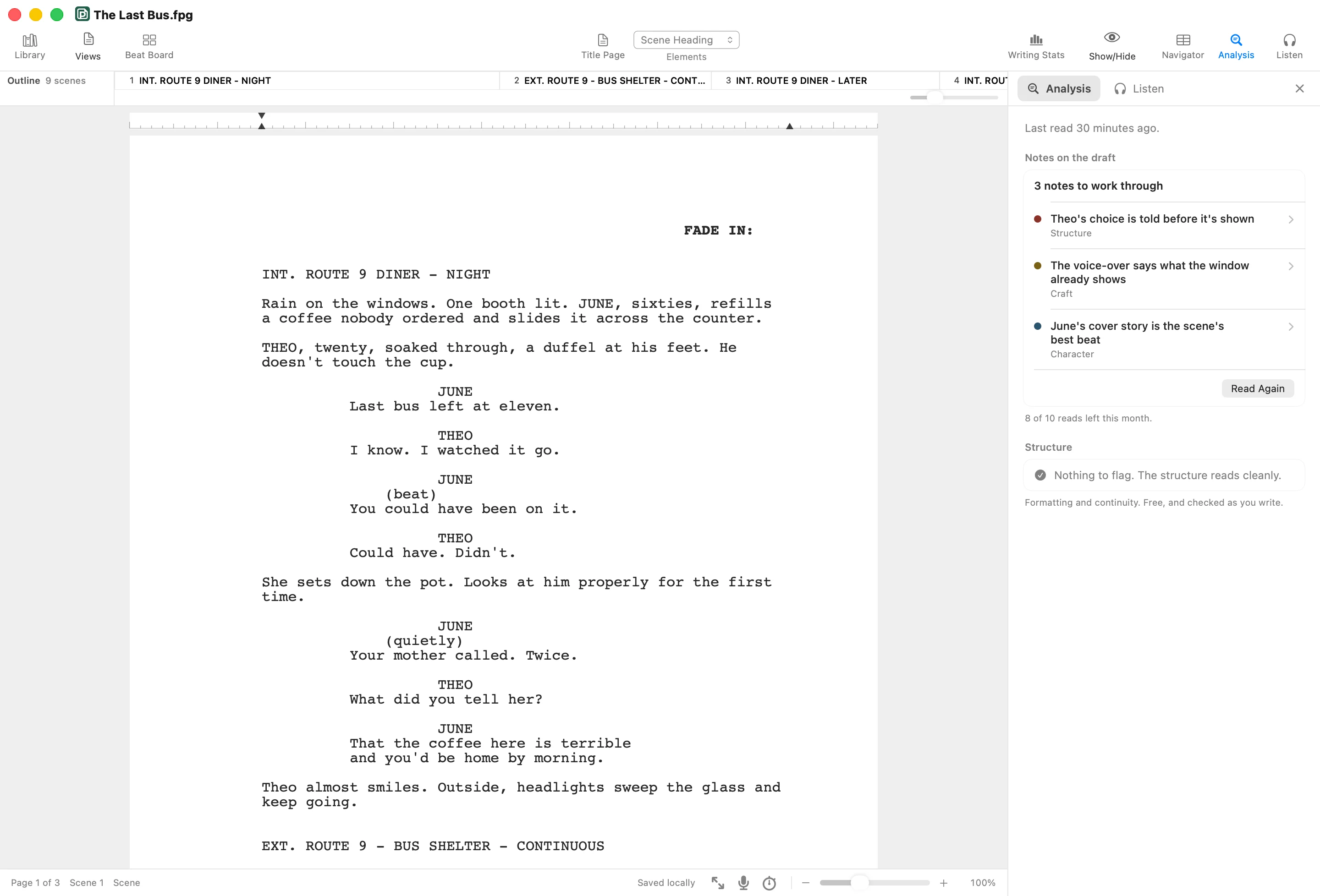
    Analysis open beside a script on the Mac, with notes on the draft listed by importance.

    Analysis, beside the page. Ask for notes on the whole draft and read them beside the page, each one tied to the lines it's about.

    Listen. Hear the script read through by a full cast, with the line being read highlighted on the page.

    Open PDF and Word scripts. Open screenplays saved as PDF or Word and read them on your Mac, offline.

  16. First Page One 1.0.5

    A smoother sidebar

    The library sidebar no longer stutters as it opens and closes. 1.0.4 wouldn't open, and was withdrawn the same evening. 1.0.5 replaces it.

  17. First Page One 1.0.3

    Your plan, straight away

    Returning from checkout refreshes your plan in the app at once, instead of leaving it on the free plan until you refreshed it yourself. Your first paid launch says welcome, once.

  18. First Page One 1.0.2

    Checkout fixes

    Buying a First Page One license from the site works from start to finish, and the installer is cleaner.

  19. First Page One 1.0.1

    Checkout on the site

    Payment for First Page One now runs through checkout on the site.

  20. First Page One 1.0.0

    First Page One for Mac

    A screenplay page in First Page One on the Mac, set in Courier with the toolbar above it.

    Screenwriting, native to the Mac. First Page One is a Mac app through and through, with real US Letter pages in 12-point Courier that format as you type. Tab and Return move between elements, Command-1 to Command-7 set them, and Script Assist completes character names, scene headings and transitions.

    Everything around the page. A title page, the Navigator for jumping between scenes, the Beat Board, writing sprints and writing stats are all in the window.

    Your files, your way. Open and save Final Draft and Fountain files, and print or export a PDF.

    Reading is free. Open any script and read it without paying anything. Activate a license when you're ready to write.

Write with the newest First Page.

Download it for Mac, or write in your browser.

macOS 14 or newer, on Apple silicon and Intel.